YouTube multi-camera show
Switch between cameras and screen capture, add titles and clips, then record and publish the finished program.
Camera + screen + graphics + live outputProfessional live video production software for Windows.
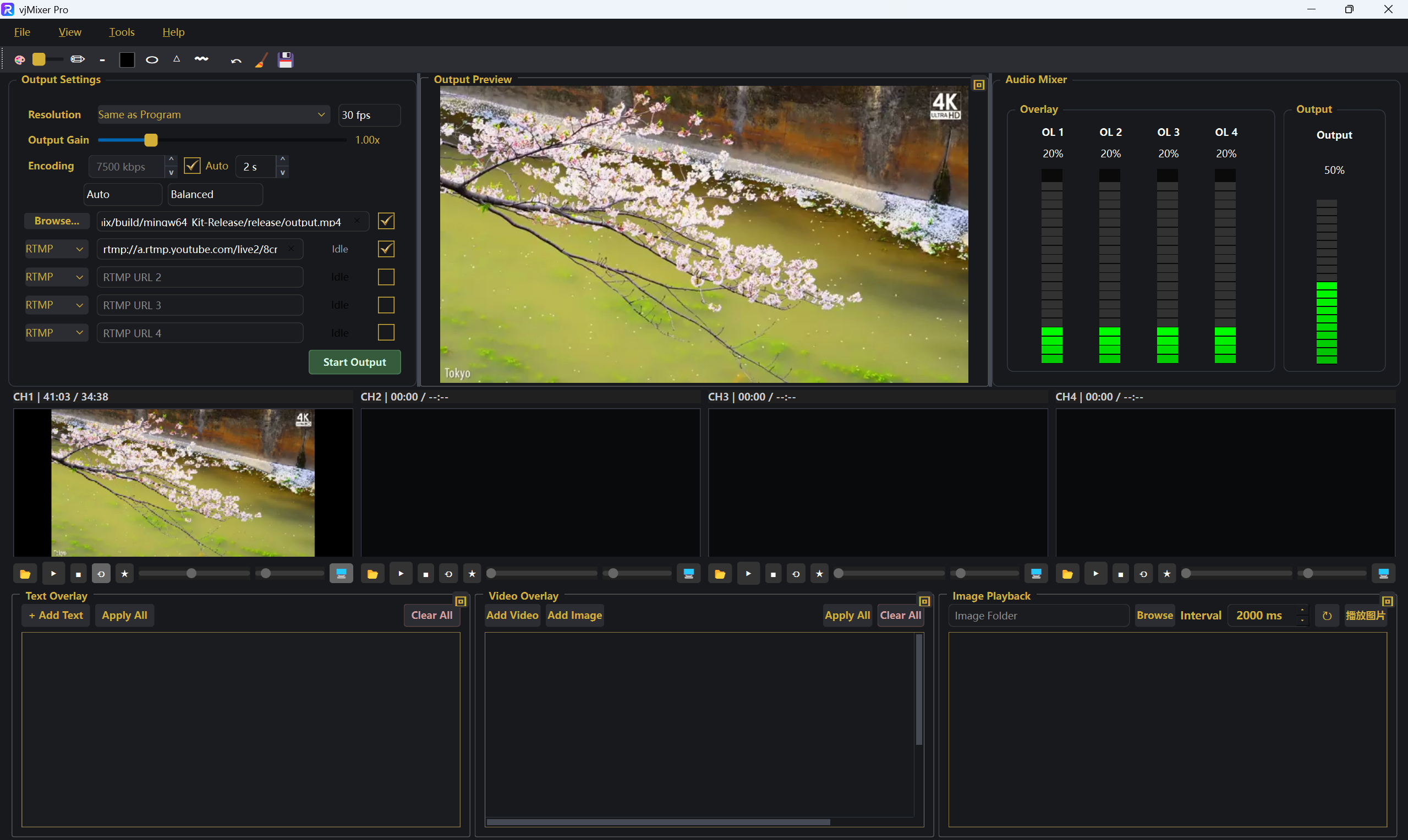
Mix cameras, screens, video, images, titles, and audio in one 16:9 production workspace. Produce at 1440p or 4K, record locally, and send the finished program to as many as four network destinations. Conditional 8K HEVC output is available on supported hardware.
Built for real productions
The familiar vjMixer workflow, with higher output and layout limits.
Choose 1440p or 4K for live production. Capable hardware can also provide 8K HEVC output for compatible recording or delivery workflows.
Send the same production to up to 4 independent RTMP/RTMPS, SRT, RIST, RTP, UDP, HTTP, or TCP targets.
Build richer layouts with up to 8 video or image layers, titles, and branding.
Build a production in three clear steps.
Bring in cameras, screen capture, video files, images, documents, or streaming URLs.
Switch between inputs and arrange titles, graphics, and video layers in the output.
Save the finished production as MP4, MKV, or AVI, or publish it to up to 4 network destinations.
Production scenarios
Each workflow brings sources, graphics, audio, recording, and delivery into the same production workspace.
Switch between cameras and screen capture, add titles and clips, then record and publish the finished program.
Camera + screen + graphics + live outputKeep presentation media, lyrics, lower thirds, cameras, and audio ready while producing a local backup.
Program output + stream + recordingPresent the instructor, desktop, documents, and supporting video in a consistent recorded lesson.
Presenter + course material + recordingCheckmarks mean the feature is included; numbers are per-edition limits.
| Capability | vjMixer | vjMixer Pro |
|---|---|---|
| Multi-source input (cameras, streaming URLs, desktop, documents, local files) | ||
| Multi-channel production (up to 4 input channels) | ||
| Maximum published 16:9 output | 1080p | 1440p / 4K Conditional 8K HEVC |
| MP4, MKV, and AVI recording | ||
| RTMP/RTMPS, SRT, RIST, RTP, UDP, HTTP, and TCP output | ||
| Same as Program resolution with output-size lock while live | ||
| NVIDIA, Intel, and AMD hardware encoding when supported | ||
| Subtitles & text graphics | ||
| Media playback tools (e.g. image sequences) | ||
| Video layering, overlay, sizing, and layer order | ||
| Optional branding watermarks (your assets) | ||
| Free trial | ||
| Trial output watermark (removed after license purchase) | Trial only | Trial only |
| Licensed output (no trial watermark) | ||
| Max live stream destinations | 1 | 4 |
| Maximum simultaneous video / image overlay layers | 4 | 8 |
Optional branding watermarks are your creative overlays. The trial watermark is applied by the evaluation build and is removed once the product is licensed.
Perpetual license
Try vjMixer Pro before purchase, then license the full production workflow on up to three devices.
System requirements
The current published canvas is 16:9. 8K requires a compatible HEVC hardware encoder and target; ordinary RTMP/RTMPS workflows use H.264 and should use a supported lower resolution. Practical frame rate and multi-output capacity depend on your GPU, CPU, storage, network, sources, and encoder settings.